Now we enter the core of artificial behaviors and in particular swarm robotics, your robots have an actual task, exploring an environement and retrieving resources for survival: foraging.
Remembering where you came from: Odometry
While you can forage by just randomly finding resources, and then randomly finding your way back to the nest, let’s introduce a concept that will help you aleviate such randomness: odometry. This is a process that allows you to measure your displacement in space based on proprioception. In short, when you close your eyes, try to move in a straight line, and then after 3 seconds try to extrapolate where you might be, you are using odometry. And when you realise you were not following a straight line, but drifting, this is because it is a very biased and noisy process. For now, we assume robots to be perfect at understanding how they move. We will change that in the next subsection.
Here is a function using odometry to update a position in space, following the new frame of reference of the moving robot:
function update_vector_with_odometry(v)
  local dl = robot.wheels.distance_left
  local dr = robot.wheels.distance_right
  local L  = robot.wheels.axis_length

  local dtheta = (dr - dl) / L
  local d = (dr + dl) / 2

  v = v - vector2(d, 0)
  v:rotate(-dtheta)

  return v
end
And here is a way to use it! The robot will move for a while, exploring the arena, and then go back to its previous position.
target = vector2(0,0)
t = 0


function step()

  t = t+1
  target = update_vector_with_odometry(target)

  if(t%700 < 500) then
    wRand = 1
    wTarg = 0
    robot.overo_leds.set_all_colors(0,0,0)
	else
    robot.overo_leds.set_all_colors(1,0,0)
    wRand = 0
    wTarg = 1
	end

  f = wRand * random_walk_force() + wTarg * target
  force_to_wheels(f)

end
One thing to keep in mind, odometry is based on the expected movement from the wheels. If the robot glides (because blocked against a wall or another robot) then it will think it is further than it actually is, and will introduce bias in its odometry! Another good reason to avoid contact at all costs, using both RAB and proximity sensors!
Simulating real life: Noise
Real life is not as pure as our CGI simulation. There can be variations in the conditions, and in particular, noise! Either from outside perturbations, or at least because no sensor is perfect. It can be useful to simulate that as well, just to be sure your behavior can handle a bit of noise, and hence is more realistic! This makes it more likely that your code can work on real robots.
You can add noise in the configuration file. Below is an example of how you would add noise for the different sensors and actuators. Try to implement a few, and look at how crazy the sensors behave when you inspect a robot! Are your past behaviors still working?
<sensors>
    <epuck_range_and_bearing implementation="medium" medium="rab" show_rays="false" data_size="2" noise_std_dev="0.0" real_range_noise="false" max_packets="100" loss_probability="0.0"/>
    <epuck_proximity implementation="default" noise_level="0.1"/>
    <epuck_light implementation="default" noise_level="0.1"/>
    <epuck_ground implementation="rot_z_only" noise_level="0.1"/>
</sensors>

<actuators>
    <epuck_wheels implementation="default" noise_std_dev="1"/>
    <differential_steering implementation="default"
                       vel_noise_range="-0.1:0.2"
                       dist_noise_range="-10.5:13.7" />
</actuators>
For instance: the attribute ‘vel_noise_range’ regulates the noise range on the velocity returned by the sensor, and the attribute ‘dist_noise_range’ sets the noise range on the distance covered by the wheels.
Foraging alone, sad
You can get a new floor picture here, be sure to change its name, or update the one you are using in the configuration file! You can as well get inspired by it and draw your own (just be sure it has only three colors, white, grey and black, and nothing in between, not even on the edges of the shapes!). Here, the black shape in the center in the nest, and the grey shapes around it are resources. The aim here is to forage (nice) alone (sad). We might see later a way to collaborate here, but… it seems to be a bit too complex for such a workshop for now.
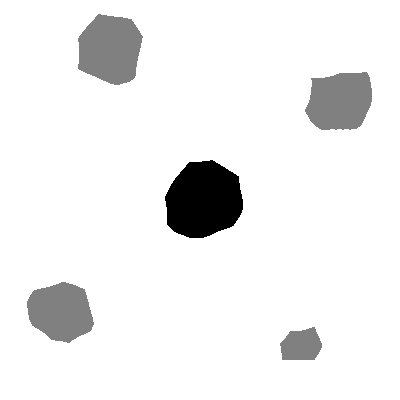
Since it is all about remembering positions, you might want to have the robots spawn in the nest (by modifying the configuration file) so they all start with the nest in memory.
The following version is, like most examples in the workshop, an exercise in concision and readability, to the point of not having the best behavior. You will see that often, robots lose quickly their past information when reaching it, as they cross it before entering their target. First run the code, then let’s brainstorm solutions to that issue!
BLACK_THRESHOLD = 0.3
GREY_THRESHOLD = 0.6
REACHING_RANGE = 1
MAX_SPEED = 10

-- put an _ in front of the name of the variable you want to appear on top of the inspector, so you can see them live !
_state = "EXPLORE"

resource = nil
nest = nil
target = nil

angle = 0


function step()

-- update all stored vectors with odometry
  if resource then resource = update_vector_with_odometry(resource) end
  if nest then nest = update_vector_with_odometry(nest) end
  if target then target = update_vector_with_odometry(target) end

  -- detect zones
  local on_resource = robot.ground.center > BLACK_THRESHOLD and robot.ground.center < GREY_THRESHOLD
  local on_nest     = robot.ground.center < BLACK_THRESHOLD

  if on_resource then
    resource = vector2(0,0)
  end

  if on_nest then
    nest = vector2(0,0)
  end


  if _state == "EXPLORE" then
    robot.overo_leds.set_all_colors(0,0,0)
    if resource then robot.overo_leds.set_single_color(1, 1,0,0) end
    if nest     then robot.overo_leds.set_single_color(2, 0,0,1) end

    if resource and nest then
    	if on_nest then
        _state = "TO_RESOURCE"
        target = resource
      end

    	if on_resource then
        _state = "TO_NEST"
        target = nest
      end
    end

  elseif _state == "TO_RESOURCE" then
    robot.overo_leds.set_all_colors(1,0,0)
    target = resource

    if on_resource then
      _state = "TO_NEST"
      target = nest
    end

    if resource:length() < REACHING_RANGE then
      resource = nil
      target = nil
      _state = "EXPLORE"
  	 end

  elseif _state == "TO_NEST" then
    robot.overo_leds.set_all_colors(0,0,1)
    target = nest

    if on_nest then
      _state = "TO_RESOURCE"
      target = resource
    end

    if nest:length() < REACHING_RANGE then
      nest = nil
      target = nil
      _state = "EXPLORE"
  	 end

  end


  wProx = -10
  wRand = 1
  wTarg = 1
  wRAB = -1

  f = vector2(0,0)

  if _state == "EXPLORE" then
  	 f = wProx * proximity_to_force() + wRAB * rab_to_force() + wRand * random_walk_force()
  else
    targ = vector2(target.x, target.y)
	 targ:normalize()
    f = wProx * proximity_to_force() + wRAB * rab_to_force() + wTarg * targ
  end

  force_to_wheels(f)

end
Social Odometry
In the end, this is a bit too complex for this workshop, but here is pieces of code that can be useful. Ask me first before exploring here. In any case, this code use 5 values when robots send messages, so be sure to change that in the configuration file.
Passive broadcast when you are not trying to share info about a target
-- passive broadcast
  robot.range_and_bearing.set_data(1, robot.id)
  robot.range_and_bearing.set_data(2, 0)
  robot.range_and_bearing.set_data(3, 0)
  robot.range_and_bearing.set_data(4, 0)
  robot.range_and_bearing.set_data(5, 0)
Checking if you have idle neighbors around you, to whom you could share information.
function get_idle_neighbor()
  for _, p in ipairs(robot.range_and_bearing) do
    if p.data[2] + p.data[3] + p.data[4] + p.data[5] == 0 then
      return p
    end
  end
  return nil
end
Sending information (bearing of the robot, position of the target) to a specific robot (id)
function send_target_to_neighbor(target_vec, idNeighbor, bearingNeighbor)
  robot.range_and_bearing.set_data(1, robot.id)          -- myId
  robot.range_and_bearing.set_data(2, idNeighbor)        -- yourId
  robot.range_and_bearing.set_data(3, target_vec.x)      -- pX
  robot.range_and_bearing.set_data(4, target_vec.y)      -- pY
  robot.range_and_bearing.set_data(5, bearingNeighbor) -- theta
end
Now, I should check if I receive a message specifically for me:
function receive_shared_target()
  for _, p in ipairs(robot.range_and_bearing) do
    if p.data[2] == robot.id then
      return reconstruct_target_in_my_frame(p)
    end
  end
  return nil
end
And now, when I receive information about a target, I need to reconstruct it in my own frame of reference:
function reconstruct_target_in_my_frame(packet)
  local p_i = vector2(packet.data[3], packet.data[4])   -- target in sender frame
  local theta_i = packet.data[5]                        -- angle sender saw me at

  local d_j = vector2(packet.range, 0)
  d_j:rotate(packet.horizontal_bearing)                 -- sender position in my frame

  local delta = packet.horizontal_bearing + math.pi - theta_i

  local rotated_p_i = vector2(p_i)
  rotated_p_i:rotate(delta)

  local p_j = d_j + rotated_p_i
  return p_j
end
You have here the building blocks to create such a behavior.
Exploration - Social Foraging & Decision
If not for social odometry, you might want to use communication from previous sessions to make the robots forage together, and possibly even decide on the best resource to explore!
The first step would be to include the leader/follower behavior in a helpful way. For instance, only a robot with info about a resource can be a leader, and a follower would only follow until it reaches a resource.